> ## Documentation Index
> Fetch the complete documentation index at: https://docs.pods.finance/llms.txt
> Use this file to discover all available pages before exploring further.
# Architecture Overview
> Understanding the Pods API system architecture and trustless operation flow
Pods API operates as a trustless DeFi aggregation platform. We do not hold, manage, or pass any funds through our smart contracts. Transaction signing and propagation are handled entirely on your side, ensuring full custody remains with you.
## System Architecture
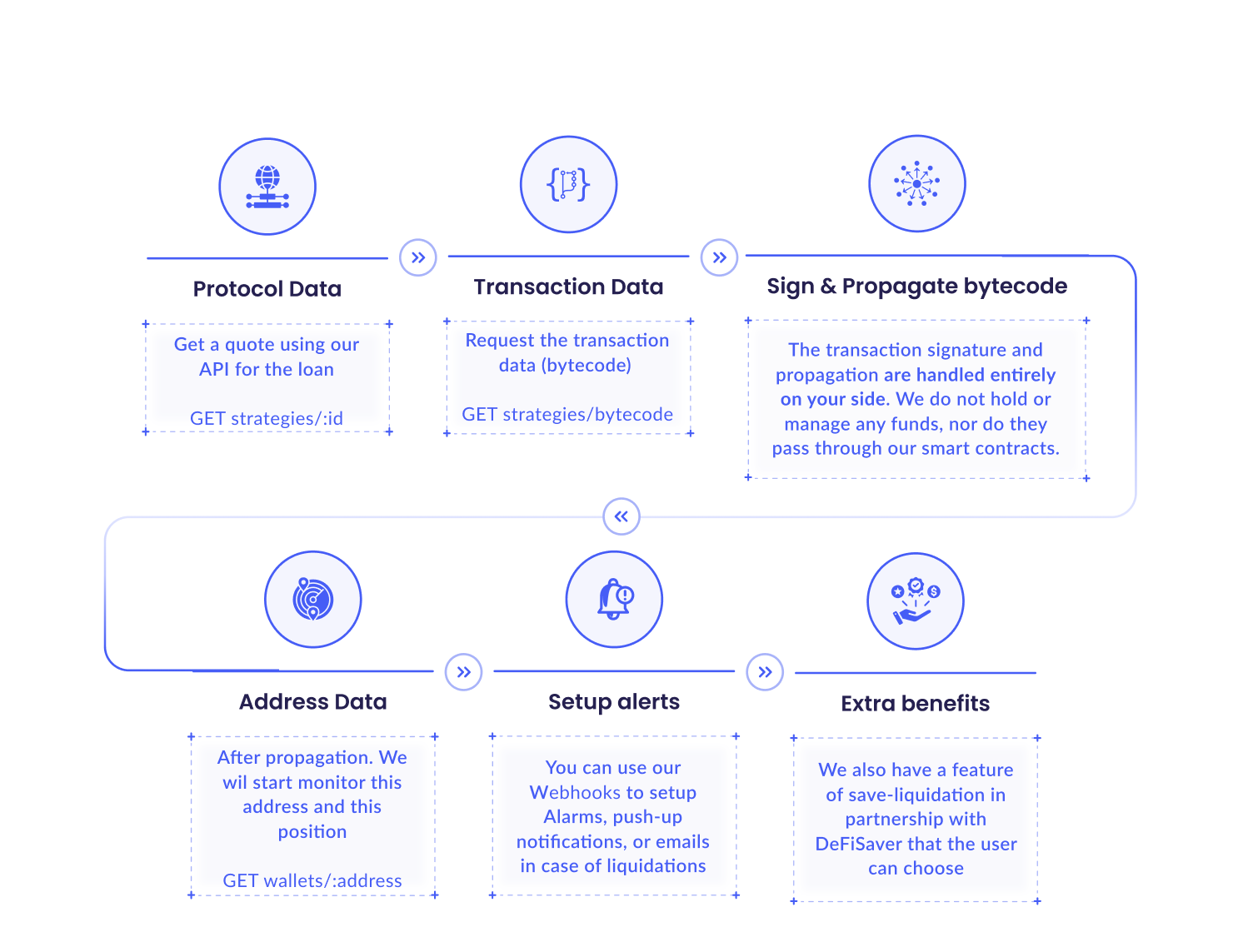 The diagram above illustrates the complete flow of interactions between your application, Pods API, and various DeFi protocols across multiple blockchain networks.
## API Flow Patterns
### Canonical chain identifiers
Swap quotes, strategy bytecode payloads, and related responses expose **`chainIdIn`** (source network) and **`chainIdOut`** (destination) as numeric EVM chain IDs. Use them for routing and display instead of string network names where possible. Single-network flows (for example `GET /transfer/bytecode`) use **`chainId`**. Listing actions supports optional query **`chainId`** to filter by step network. See the OpenAPI introduction and [Get a Quote](/guides/swaps/get-quote) for request examples.
### 1. Protocol Data
Retrieve quotes and protocol information using the API.
**Endpoints:**
```http theme={null}
GET /strategies/:id
GET /strategies
GET /v2/swap/quote
```
**Purpose:**
* Fetch available protocols and their current rates
* Get quotes for swaps or yield positions
* Compare rates across different protocols and chains
### 2. Transaction Data
Request transaction data (bytecode) needed for execution.
**Endpoints:**
```http theme={null}
POST /v2/swap/bytecode
GET /strategies/{strategyId}/bytecode
GET /transfer/bytecode
```
**Purpose:**
* Provides the bytecode for executing transactions
* Supports multiple transaction types:
* Cross-chain swaps
* Same-chain swaps
* Yield positions (deposit/withdraw)
* Token and native token transfers
### 3. Sign & Propagate Bytecode
**Atomic execution required.** `bytecode[]` is a bundle — execute all legs on the same
`chainId` in **one transaction** (EIP-7702 batch, smart-account userOp, or Safe/Fireblocks
batch). Sending legs as separate transactions can leave funds stuck in `PENDING` actions.
See [Executing Bytecode](/getting-started/executing-bytecode) for the `output` decision tree.
**User Responsibility:** Transaction signature and propagation are handled
**entirely on your side**. Pods does not hold, manage, or pass any funds
through its smart contracts.
**Key Points:**
* Users sign transactions themselves using their own wallets
* Choose `output` (`bytecode`, `userOperation`, `fireblocks`) to match your wallet stack
* Transaction propagation is handled by the user
* Full custody remains with the user at all times
* Pods never has access to your private keys or funds
### 4. Position Monitoring
After transaction execution, Pods monitors positions and provides updates.
**Endpoints:**
```http theme={null}
GET /actions/{id}
GET /actions
GET /wallets/:wallet
GET /wallets/:wallet/history/:strategyId
```
**Purpose:**
* Track execution status after `POST /v2/swap/bytecode` or cross-chain strategy bytecode returns an `id`
* Track wallet activity and positions across chains
* Monitor yield earnings in real-time
* View swap history and transaction status
* Aggregate positions across multiple protocols
### 5. Alerts & Notifications
Configure alerts and receive notifications for position monitoring.
**Features:**
* **Webhook notifications** - Real-time callbacks to your server
* **Transaction status updates** - Track cross-chain transaction progress
* **Position changes** - Monitor yield earnings and balances
* **APY change notifications** - Get alerted when rates change significantly
Configure webhook URLs in your customer dashboard to receive automatic
notifications for transaction status changes.
### 6. Integration Features
Additional features to enhance user protection and experience.
**Available Features:**
* **Multi-provider routing** - Automatic selection of best swap provider
* **Cross-chain optimization** - Best route for bridge transactions
* **Real-time APY tracking** - Updated protocol rates
* **Gas estimation** - Accurate gas cost predictions
* **Transaction simulation** - Pre-execution validation
## Rate Limiting
API rate limits ensure fair usage and system stability: - **100 requests per
minute** per API key - **1,000 requests per hour** per API key
If you need higher limits, contact our support team.
Check real-time API uptime and incident history
## Success responses
Successful calls return **HTTP 2xx** with a JSON body that is the resource or a small outcome object (for example `{ "status": "ok" }` for health checks). Responses are **not** wrapped in `{ "success": true }`—use the status code to detect success. Some deletes return **204 No Content** with an empty body. Errors always use **4xx/5xx**; the API does not return `success: false` with HTTP 200.
## Dates and times
Response bodies expose instants as **ISO 8601** strings in UTC (RFC 3339), for example `2026-04-08T14:30:00.000Z`. This applies to fields such as swap `quote.deadlineDate`, strategy quote `timestamp` / `validUntil`, tracking `createdAt` / `updatedAt` / `finishedAt`, and wallet history timestamps. Swap `quote.deadline` is a Unix timestamp in seconds. Query parameters that filter by date (for example on `GET /v2/strategies/:strategyId`) use the same string format; `z.string().datetime()` accepts values like `2026-01-01T00:00:00Z`.
## Error Handling
Failed requests return JSON in a single shape: `{ "error": { "code", "message", "details?" } }` (the numeric status is only in the HTTP status line). Validation errors (**422**) include `details.errors` with field paths and messages.
The API uses standard HTTP response codes:
| Code | Meaning | Description |
| ---- | --------------------- | ------------------------------------------------- |
| 200 | Success | Request completed successfully |
| 204 | No Content | Success with no response body (e.g. some deletes) |
| 400 | Bad Request | Invalid parameters or request format |
| 401 | Unauthorized | Invalid or missing API key |
| 404 | Not Found | Resource does not exist |
| 409 | Conflict | Resource already exists or conflicting state |
| 422 | Unprocessable Entity | Validation failed (e.g. Zod) |
| 429 | Too Many Requests | Rate limit exceeded |
| 500 | Internal Server Error | Server-side error occurred |
## Key Guarantees
No fund custody - you maintain full control of your assets at all times
Real-time tracking of your DeFi positions across chains and protocols
Webhook alerts for transaction status and position updates
Seamless operations across Ethereum, Base, Optimism, Arbitrum, Solana,
Polygon, Gnosis, and Bitcoin
## Next Steps
Atomic batching and output format (`bytecode` vs `userOperation` vs `fireblocks`)
Add yield to your app in 5 minutes
Deposit, withdraw, and monitor positions
Copy-paste end-to-end strategy deposit
Same-chain & cross-chain swap quotes
Read more about [Why Pods](/getting-started/why-pods) and explore our
[complete code examples](/examples/javascript/strategy-deposit).
The diagram above illustrates the complete flow of interactions between your application, Pods API, and various DeFi protocols across multiple blockchain networks.
## API Flow Patterns
### Canonical chain identifiers
Swap quotes, strategy bytecode payloads, and related responses expose **`chainIdIn`** (source network) and **`chainIdOut`** (destination) as numeric EVM chain IDs. Use them for routing and display instead of string network names where possible. Single-network flows (for example `GET /transfer/bytecode`) use **`chainId`**. Listing actions supports optional query **`chainId`** to filter by step network. See the OpenAPI introduction and [Get a Quote](/guides/swaps/get-quote) for request examples.
### 1. Protocol Data
Retrieve quotes and protocol information using the API.
**Endpoints:**
```http theme={null}
GET /strategies/:id
GET /strategies
GET /v2/swap/quote
```
**Purpose:**
* Fetch available protocols and their current rates
* Get quotes for swaps or yield positions
* Compare rates across different protocols and chains
### 2. Transaction Data
Request transaction data (bytecode) needed for execution.
**Endpoints:**
```http theme={null}
POST /v2/swap/bytecode
GET /strategies/{strategyId}/bytecode
GET /transfer/bytecode
```
**Purpose:**
* Provides the bytecode for executing transactions
* Supports multiple transaction types:
* Cross-chain swaps
* Same-chain swaps
* Yield positions (deposit/withdraw)
* Token and native token transfers
### 3. Sign & Propagate Bytecode
**Atomic execution required.** `bytecode[]` is a bundle — execute all legs on the same
`chainId` in **one transaction** (EIP-7702 batch, smart-account userOp, or Safe/Fireblocks
batch). Sending legs as separate transactions can leave funds stuck in `PENDING` actions.
See [Executing Bytecode](/getting-started/executing-bytecode) for the `output` decision tree.
**User Responsibility:** Transaction signature and propagation are handled
**entirely on your side**. Pods does not hold, manage, or pass any funds
through its smart contracts.
**Key Points:**
* Users sign transactions themselves using their own wallets
* Choose `output` (`bytecode`, `userOperation`, `fireblocks`) to match your wallet stack
* Transaction propagation is handled by the user
* Full custody remains with the user at all times
* Pods never has access to your private keys or funds
### 4. Position Monitoring
After transaction execution, Pods monitors positions and provides updates.
**Endpoints:**
```http theme={null}
GET /actions/{id}
GET /actions
GET /wallets/:wallet
GET /wallets/:wallet/history/:strategyId
```
**Purpose:**
* Track execution status after `POST /v2/swap/bytecode` or cross-chain strategy bytecode returns an `id`
* Track wallet activity and positions across chains
* Monitor yield earnings in real-time
* View swap history and transaction status
* Aggregate positions across multiple protocols
### 5. Alerts & Notifications
Configure alerts and receive notifications for position monitoring.
**Features:**
* **Webhook notifications** - Real-time callbacks to your server
* **Transaction status updates** - Track cross-chain transaction progress
* **Position changes** - Monitor yield earnings and balances
* **APY change notifications** - Get alerted when rates change significantly
Configure webhook URLs in your customer dashboard to receive automatic
notifications for transaction status changes.
### 6. Integration Features
Additional features to enhance user protection and experience.
**Available Features:**
* **Multi-provider routing** - Automatic selection of best swap provider
* **Cross-chain optimization** - Best route for bridge transactions
* **Real-time APY tracking** - Updated protocol rates
* **Gas estimation** - Accurate gas cost predictions
* **Transaction simulation** - Pre-execution validation
## Rate Limiting
API rate limits ensure fair usage and system stability: - **100 requests per
minute** per API key - **1,000 requests per hour** per API key
If you need higher limits, contact our support team.
Check real-time API uptime and incident history
## Success responses
Successful calls return **HTTP 2xx** with a JSON body that is the resource or a small outcome object (for example `{ "status": "ok" }` for health checks). Responses are **not** wrapped in `{ "success": true }`—use the status code to detect success. Some deletes return **204 No Content** with an empty body. Errors always use **4xx/5xx**; the API does not return `success: false` with HTTP 200.
## Dates and times
Response bodies expose instants as **ISO 8601** strings in UTC (RFC 3339), for example `2026-04-08T14:30:00.000Z`. This applies to fields such as swap `quote.deadlineDate`, strategy quote `timestamp` / `validUntil`, tracking `createdAt` / `updatedAt` / `finishedAt`, and wallet history timestamps. Swap `quote.deadline` is a Unix timestamp in seconds. Query parameters that filter by date (for example on `GET /v2/strategies/:strategyId`) use the same string format; `z.string().datetime()` accepts values like `2026-01-01T00:00:00Z`.
## Error Handling
Failed requests return JSON in a single shape: `{ "error": { "code", "message", "details?" } }` (the numeric status is only in the HTTP status line). Validation errors (**422**) include `details.errors` with field paths and messages.
The API uses standard HTTP response codes:
| Code | Meaning | Description |
| ---- | --------------------- | ------------------------------------------------- |
| 200 | Success | Request completed successfully |
| 204 | No Content | Success with no response body (e.g. some deletes) |
| 400 | Bad Request | Invalid parameters or request format |
| 401 | Unauthorized | Invalid or missing API key |
| 404 | Not Found | Resource does not exist |
| 409 | Conflict | Resource already exists or conflicting state |
| 422 | Unprocessable Entity | Validation failed (e.g. Zod) |
| 429 | Too Many Requests | Rate limit exceeded |
| 500 | Internal Server Error | Server-side error occurred |
## Key Guarantees
No fund custody - you maintain full control of your assets at all times
Real-time tracking of your DeFi positions across chains and protocols
Webhook alerts for transaction status and position updates
Seamless operations across Ethereum, Base, Optimism, Arbitrum, Solana,
Polygon, Gnosis, and Bitcoin
## Next Steps
Atomic batching and output format (`bytecode` vs `userOperation` vs `fireblocks`)
Add yield to your app in 5 minutes
Deposit, withdraw, and monitor positions
Copy-paste end-to-end strategy deposit
Same-chain & cross-chain swap quotes
Read more about [Why Pods](/getting-started/why-pods) and explore our
[complete code examples](/examples/javascript/strategy-deposit).