> ## Documentation Index
> Fetch the complete documentation index at: https://docs.pods.finance/llms.txt
> Use this file to discover all available pages before exploring further.
# Check Protocol Info
> Learn how to retrieve yield protocol information including APY rates and terms
Before implementing yield features in your application, you'll need to retrieve essential information such as APY rates, minimum deposit requirements, and other terms. This guide explains how to fetch this data using our API endpoints.
In the yield category, we encompass various passive income-generating
activities in DeFi. This includes lending (where users earn interest by
providing liquidity), investing in yield-generating vaults (which
automatically compound returns), and staking (where users lock tokens to earn
rewards).
## Protocol Information
First, retrieve the list of all supported protocols:
```http theme={null}
GET /strategies
```
The JSON body is `{ "data": [ …strategies ], "pagination": { … } }`. Use `pagination.hasMore`, `pagination.total`, and `pagination.totalPages` to page through results. Query parameters include `page`, `limit` (default limit is 100), `network`, `protocol`, and `category` to filter results. See the OpenAPI description for the full `ListPagination` shape.
Then, fetch specific protocol information using:
```http theme={null}
GET /strategies/:id
```
**Required Parameters:**
| Parameter | Description | Example |
| --------- | ----------- | ------------------- |
| :id | Strategy ID | `Aave-USDC-polygon` |
**Example Request:**
```http theme={null}
GET /strategies/Aave-USDC-polygon
```
**Response includes:**
* Composite strategy ID (`id`) in the format `{protocol}-{assetName}-{network}`
* Protocol branding (`protocolInfo`) — `{ name, logo }` stored on each `Strategy` document in MongoDB
* Network (`chain`) — `{ name, id, explorer, logo }`
* Tokens (`assetToken`, `underlyingToken`) — `{ name, address, symbol, decimals, logo? }`
* Current APY rate (`apy`), fee-adjusted rates (`grossAPY`, `netAPY`), and historical APY (`avgApy`, `inceptionApy`)
* Asset info (`asset` contract address, `assetName`, `assetDecimals`)
* Protocol fee in basis points (`fee`)
* Available actions (`availableActions`)
* Pause status (`paused`)
**Example Response:**
```json theme={null}
{
"id": "Aave-USDC-polygon",
"protocol": "Aave",
"protocolInfo": {
"name": "Aave",
"logo": "https://pods-logos.s3.us-east-1.amazonaws.com/logos/aave.png"
},
"network": "polygon",
"networkId": "137",
"chain": {
"name": "polygon",
"id": 137,
"explorer": { "name": "Polygonscan", "url": "https://polygonscan.com" },
"logo": "https://pods-logos.s3.us-east-1.amazonaws.com/logos/polygon.png"
},
"asset": "0x2791Bca1f2de4661ED88A30C99A7a9449Aa84174",
"assetName": "USDC",
"assetDecimals": 6,
"assetToken": {
"name": "USD Coin",
"address": "0x2791Bca1f2de4661ED88A30C99A7a9449Aa84174",
"symbol": "USDC",
"decimals": 6,
"logo": "https://pods-logos.s3.us-east-1.amazonaws.com/logos/..."
},
"underlyingAsset": "0x2791Bca1f2de4661ED88A30C99A7a9449Aa84174",
"underlyingDecimals": 6,
"underlyingToken": {
"name": "USD Coin",
"address": "0x2791Bca1f2de4661ED88A30C99A7a9449Aa84174",
"symbol": "USDC",
"decimals": 6,
"logo": "https://pods-logos.s3.us-east-1.amazonaws.com/logos/..."
},
"apy": 0.0417,
"avgApy": 0.0412,
"inceptionApy": 0.0385,
"paused": false,
"fee": "0",
"performanceFeeBps": "0",
"availableActions": ["lend", "withdraw"],
"marketData": {
"tvl": "1000000000000",
"tvlUsd": 1000000.0,
"tvlChange24h": 0.012,
"lastRefreshedAt": "2024-01-20T12:00:00.000Z"
}
}
```
The `fee` and `performanceFeeBps` fields are in basis points (1 BPS = 0.01%).
See [Fees](/getting-started/fees) for the full fee structure and how markup
fees work.
## UI Integration Example
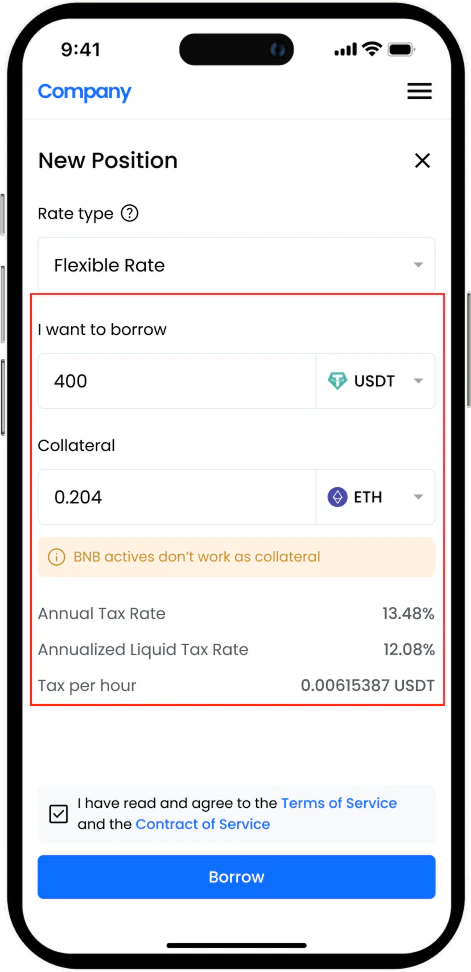 *Example UI implementation showing protocol selection*
## Next Steps
Execute a deposit into a yield protocol
Monitor your yield positions
*Example UI implementation showing protocol selection*
## Next Steps
Execute a deposit into a yield protocol
Monitor your yield positions